LogoLandingMore

快速开始

快速开始使用本产品的完整指南

快速开始

欢迎使用本产品!本指南将帮助您快速上手。

环境要求

在开始之前,请确保您的开发环境满足以下要求:

  • Node.js 18.0 或更高版本
  • npm 或 pnpm 包管理器
  • Git 版本控制

安装

npm install

运行项目

安装完成后,运行以下命令启动开发服务器:

pnpm run dev
开发服务器默认在 http://localhost:3000 运行

下一步

现在您已经成功运行了项目,接下来可以:

定制化修改

修改网站配色

1、选择一个 shadcn 主题调试器

2、为你的项目调制一套主题配色:
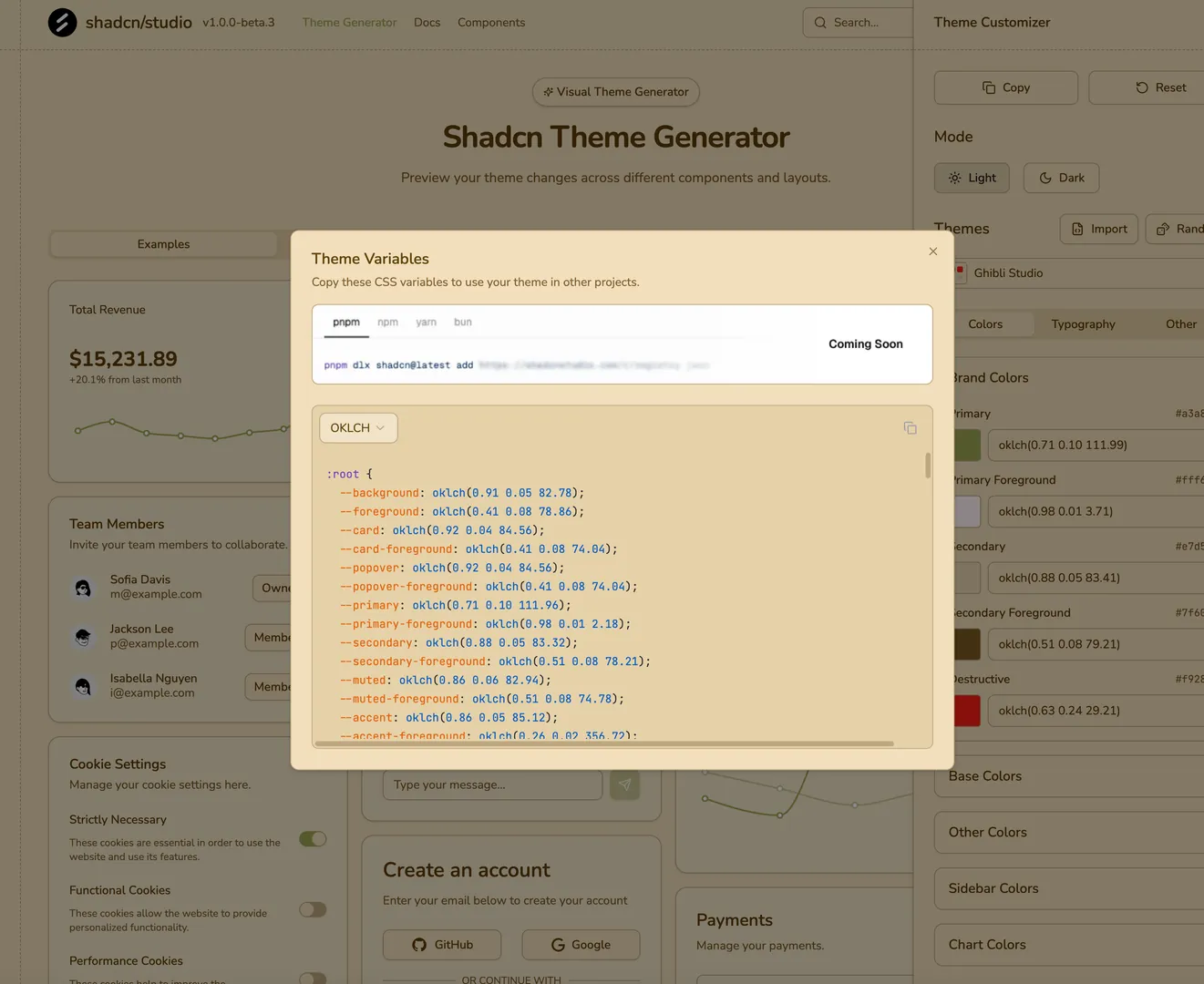
shadcnstudio-theme.webp

项目使用 tailwindcss4,请使用 oklch 颜色格式,复制主题样式

3、粘贴主题样式到项目文件:src/app/theme.css

4、重新进入项目预览页面,即可看到你定制的主题

修改落地页内容

1、打开落地页内容文件:src/i18n/pages/landing/en.json

2、使用 AI 辅助生成新的落地页内容

提示词参考:

I want to build a landing page for my product named "Flux AI Image Generator", please update the landing page json file, content reference @Web @https://www.flux.ai/

3、使用 AI 生成的内容,替换掉默认的内容

4、预览新的落地页

5、更新其他落地页内容文件

根据你的需求,把 src/i18n/pages/landing 下的所有文件都更新

修改网站多语言文案

1、打开网站多语言文件:src/i18n/messages/en.json

2、使用 AI 生成新的内容

提示词参考:

update content of this file, for my new project "Flux AI", which is an AI Image Generator, with keywords "flux ai, ai image generator"

3、修改所有文件内容

根据你的网站信息,把 src/i18n/messages 目录下的所有文件都更新

修改网站协议

在网站正式上线之前,请根据你网站提供的服务,更新网站协议。

网站协议内容位于: src/app/(legal) 目录下

1、更新隐私政策

使用 AI 生成新的隐私政策内容。

提示词参考:

update privacy-policy according to landing page content @en.json
with brand name "cursor", domain "cursor-cn.org", contact email is "support@cursor-cn.org"

用新的内容替换 src/app/(legal)/privacy-policy/page.mdx 文件中的内容,更新隐私政策。

2、更新服务条款

使用 AI 生成新的服务条款内容。

提示词参考:

update terms-of-service according to landing page content @en.json
with brand name "cursor", domain "cursor-cn.org", contact email is "support@cursor-cn.org"

修改网站 Logo 和 Icon

请为你的网站生成 Logo 和 Icon 图片,分别替换 public/logo.pngpublic/favicon.ico 两个文件。

可用于生成 Logo 的网站推荐:

修改网站地图

网站地图文件地址:public/sitemap.xml,默认内容如下:

<?xml version="1.0" encoding="UTF-8"?>
<urlset xmlns="http://www.sitemaps.org/schemas/sitemap/0.9">
  <url>
    <loc>https://www.cursor-cn.org/</loc>
    <lastmod>2025-05-07</lastmod>
    <priority>1.0</priority>
  </url>
</urlset>

修改 robots.txt

robots.txt 地址:public/robots.txt,默认内容如下:

# https://www.robotstxt.org/robotstxt.html
User-agent: *
Allow: /
 
# Sitemap files
Sitemap: https://www.cursor-cn.org/sitemap.xml

修改配置内容

开发环境的配置文件是:.env.development,线上环境的配置文件是:.env.production

请根据项目实际情况,配置这两个文件的内容。配置参考:

  • 数据库配置
  • 登录鉴权
  • 数据统计
  • 支付
  • 文件存储
# -----------------------------------------------------------------------------
# Web Information
# -----------------------------------------------------------------------------
NEXT_PUBLIC_SITE_URL = "http://localhost:3000"
NEXT_PUBLIC_PROJECT_NAME = "Template"
NEXT_PUBLIC_SITE_EMAIL = "support@codekv.com"
 
# -----------------------------------------------------------------------------
# Auth with better-auth
# https://www.better-auth.com/
# Set your Auth URL and Secret
# Secret can be generated with `openssl rand -base64 32`
# -----------------------------------------------------------------------------
BETTER_AUTH_SECRET = ""
 
# -----------------------------------------------------------------------------
# Google Auth
# https://authjs.dev/getting-started/providers/google
# -----------------------------------------------------------------------------
GOOGLE_CLIENT_ID = ""
GOOGLE_CLIENT_SECRET = ""
 
# -----------------------------------------------------------------------------
# Github Auth
# https://authjs.dev/getting-started/providers/github
# -----------------------------------------------------------------------------
GITHUB_CLIENT_ID = ""
GITHUB_CLIENT_SECRET = ""
 
# -----------------------------------------------------------------------------
# Resend
# https://resend.com/
# -----------------------------------------------------------------------------
RESEND_API_KEY = ""
 
# -----------------------------------------------------------------------------
# Payment with Stripe
# Get your API keys from https://dashboard.stripe.com/apikeys
# -----------------------------------------------------------------------------
STRIPE_SECRET_KEY = ""
NEXT_PUBLIC_STRIPE_PUBLISHABLE_KEY = ""
 
# -----------------------------------------------------------------------------
# Turnstile
# https://www.cloudflare.com/application-services/products/turnstile/
# -----------------------------------------------------------------------------
TURNSTILE_SECRET_KEY = ""
NEXT_PUBLIC_TURNSTILE_SITE_KEY = ""

项目检查

在提交项目代码前,请检查以下内容是否都已按照实际情况修改。

  • 修改网站配色。src/app/theme.css
  • 修改落地页内容。src/i18n/pages/landing/*.json
  • 修改多语言文案。src/i18n/messages/*.json
  • 修改网站协议。src/app/(legal)/**/page.mdx
  • 修改网站 Logo 和 Icon。public/logo.pngpublic/favicon.ico
  • 修改网站地图。public/sitemap.xml
  • 修改配置内容。.env.development.env.production

On this page